Tumblr’s at it again, thanks to the new European Privacy Laws. There’s probably nobody who will read this, but it pissed me off so much that I decided to make a post about it. (Ignore the weird language mish-mash, depending on your country the language might differ.)
OK, so many of us get this screen when we try to access our dash:
Realise how the ‘OK’ button is a nice, attention-grabbing blue? If you’re like me, you’re not exactly into reading a 100 pages document and tend to just click it.
My tip? DONT. Instead click on ‘Manage Options’ right next to it:
Now you’ll see this page:
Still pretty harmless, right? That ‘Accept’ button is looking really attractive right now. Instead, click on Verwalten (Probably something like ‘Manage Options’ or something in english) and you’ll get to this page:
Now that’s not too bad, right? I just switched all the buttons to ‘off’, because I’m jealously guarding my personal information and don’t want Tumblr to go off and do who knows what with it. Looks like we’re done! But wait: There’s a SHOW option.
When we click on that one, what we will get is this:
A HUGE list with OVER 300 ENTRIES of companies that can use your data by default if you’d just clicked ‘OK’ on that very first page. Coincidence that this list is hidden that much? Me thinks not. They’re all switched on by default, but I am still a petty bitch that doesn’t want to give out her data, so I switched them all off. All 300+ of them. There is no option to switch them all off at once, and even if you disable all the options above, the companies are still switched on.
(If you wonder how i got that number, I copied the list into excel and looked at the cell number. No way am I actually counting all those entries)
I too, am a petty bitch who unticked every single one.
On mobile you can switch every one of these off apart from the last one, which is covered up by the ‘done’ button. Funny how it’s the company that owns Tumblr.
Oh, and if you go back to check they all switch back on at the moment.
Okay, so two things. If you already agreed to sharing data with these companies, YOU CAN STILL DISABLE IT.
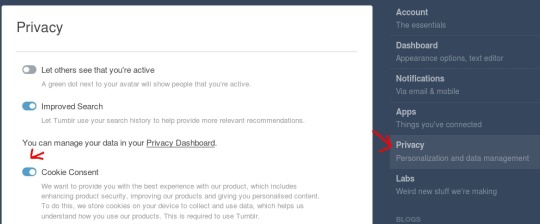
Simply go to the settings, Privacy tab and check the ‘Cookie Consent’ option. (You can un-check ‘Improved search while you’re at it because fuck tumblr).
Clicking this will automatically redirect you to the page shown in the posts above.
DIRTY HACK TIME
If you’re on your desktop, you can disable sharing data with all of these companies using a little script (because who has the patience to click over 300 checkboxes, not me lol)
To do this click the manage options button, then this button to display all the companies, and then click both ‘show’ buttons so all switches are displayed.
Right-click somewhere ON THE PAGE (preferably a blank space) and pick ‘Inspect/Inspect element` from the context menu. Now, a sidebar should appear somewhere. It should have a tab called ‘console’.
Copy this text:
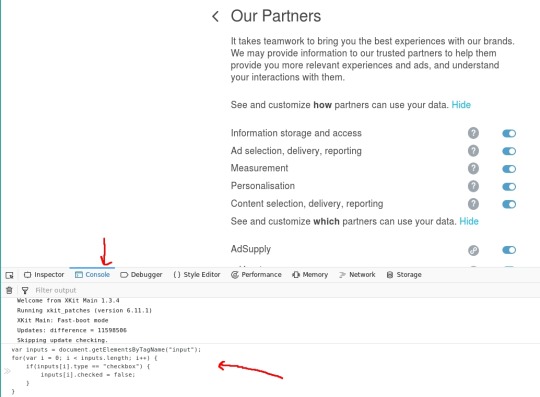
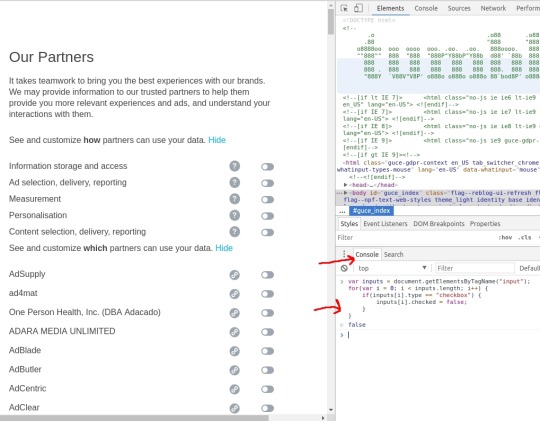
var inputs = document.getElementsByTagName(“input”); for(var i = 0; i < inputs.length; i++) { if(inputs[i].type == “checkbox”) { inputs[i].checked = false; } }
And paste it in the console input, and click enter. ALL switches should be disabled. Double-check before confirming.
How it should look in Mozilla Firefox
How it should look in Google Chrome
> Oh, and if you go back to check they all switch back on at the moment.
So does this mean that if I disabled all of them, and then clicked OK when returned to the first page (otherwise it does not let me go back to dash), it should be fine but if I return to the list to check it automatically switches them back? Oo;;
Signal boosting, gonna get on my pc and make sure it’s all fixed later today



 queerlybeloveds